

Automate Invoice Coding in IFS With AI That Learns from Your Data
Snowfox is an official IFS compatible AI add-on that automates purchase invoice coding and workflow routing with over 90% accuracy. It runs silently in the background – no new interface, just a smoother, more automated process within your IFS environment.


- Built for IFS Customers
Why Snowfox Is the Smartest Add-On for IFS Invoice Automation
Snowfox’s AI works seamlessly with IFS to eliminate the manual bottlenecks in your accounts payable process. No new UI. No rule building. Just fast, accurate automation that gets smarter over time.
Native integration with IFS Finance
No separate interface. Snowfox runs quietly in the background, enhancing your existing workflow and connecting easily to your IFS environment.
Over 90% of non-PO invoices automated
AI handles coding and routing automatically using your real historical data, eliminating manual input and reducing workload across your finance team.
Zero rule building required
Our AI learns your coding logic directly from past invoices, removing the need for templates or complex rule setup, so you can focus on higher-value work.
Go live in weeks, not months
Snowfox integrates fast, with quick setup, guided onboarding, and minimal disruption to your existing finance processes or team.
AI gets smarter over time
With every invoice processed, Snowfox continuously improves accuracy and speed, delivering more automation and greater efficiency over time.

The difference Snowfox makes
Manual invoice coding drains time and money. Here’s how automation transforms your process from day one.
| Metric | Without AI | With Snowfox |
|---|---|---|
| Invoices automated | ~20% | 90%+ |
| Average cost per invoice | €4–8 | < €1 |
| Coding accuracy | 70–80% | 98%+ |
| Setup time | Months | Weeks |
| Team workload | High manual input | Minimal intervention |
- Customer Success Stories
Here's what our IFS customers have to say about us
From multinational corporations to fast-growing businesses, finance teams are using Snowfox to automate AP and deliver measurable results.

“Snowfox has delivered us an actual value-adding AI tool to improve invoice handling efficiency. From smooth and successful implementation to continuously publishing new features that actually improves already measurably good performance, they have been there for us. Sincere recommendation to any other IFS companies.”
Martti Tapanila, Pimatic
CFO

“Snowfox has made a positive difference to our AP process! The collaboration has been smooth and straightforward throughout. Snowfox invoice coding automation has helped us already a lot and we are looking forward to significant help regarding invoice coding automation in the near future with constantly improving results.”
Emma Rienas Sandin, Nordic Paper
Finance Director

“Thanks to Snowfox, we’ve drastically reduced manual work in our purchase invoice process. It’s a practical, intelligent solution that just works.”
Jyrki Pentinlehto, Polarteknik
CFO
- Customer Success Stories
How Snowfox Works Inside Your IFS Environment
Snowfox integrates directly with your existing purchase invoice process, using 6–12 months of historical IFS data to train a custom AI model based on your coding and approval logic. It continuously learns and improves accuracy in real time, adapting to your business as it evolves.
Invoice Received
E-invoice, PDF or paper invoice enters your existing IFS workflow.
OCR & Validation
Data is extracted and prepared for automation.
AI Prediction
Snowfox auto-codes the invoice and predicts the reviewer, no rules required.
Workflow in IFS
The invoice flows through your standard IFS approval and payment process.
Feedback Loop
Final coding flows back into Snowfox. If users make changes, AI learns from them to improve future predictions.
- Why Snowfox
Curious How Well AI Would Work in Your IFS Environment?
We offer IFS users a free AI accuracy test. You provide 3-12 months of coded invoices; we show you AI performance on your real data. Time from data upload to finished report is just 3 weeks.
- Per-dimension accuracy report
- 80/20 training/testing split
- No obligation, just insight
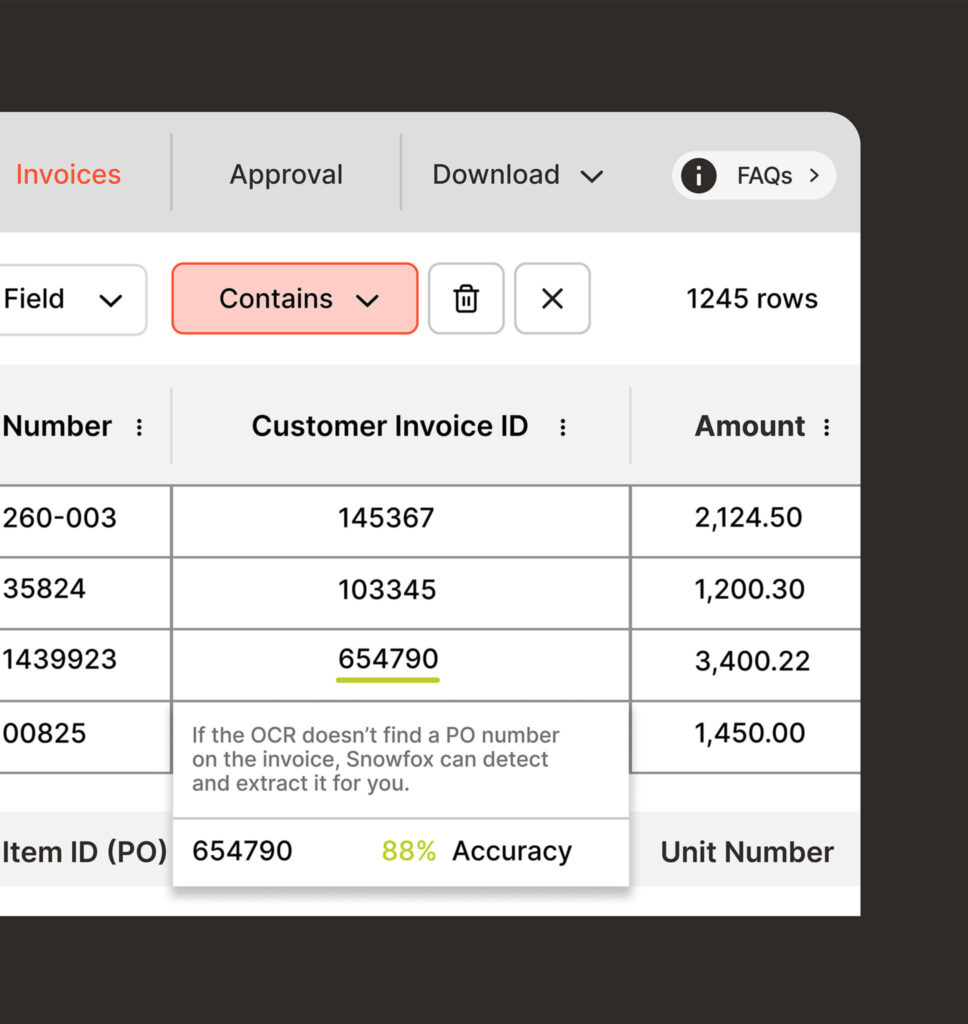
Snowfox Capabilities for IFS
- Purchase invoice coding (GL, cost centre, VAT, etc.)
- Workflow routing prediction
- OCR enrichment for missing data
- Confidence scores on all predictions
- Admin tools for feedback and optimisation
- Real-time analytics dashboard
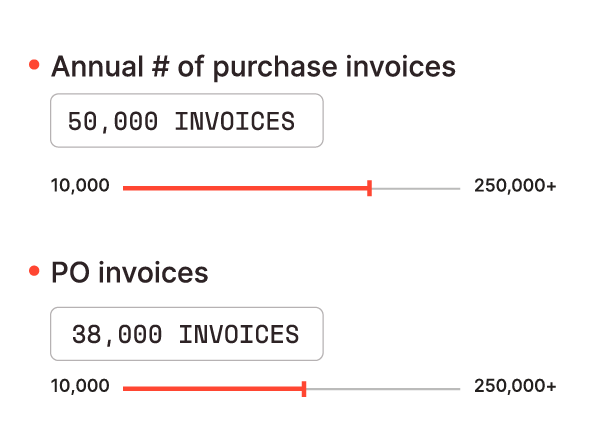
Smart, Scalable Pricing for Finance Teams
- Simple volume-based monthly fee, tailored to your invoice volume
- Low one-time implementation cost
- Transparent savings vs manual – reduce costs and scale effortlessly
How the AI Works
Does Snowfox AI learn from your own invoice data, or is it a shared global model?
Snowfox AI learns exclusively from your own invoice data — it is not a shared or global model. The system mirrors your organisation’s specific accounting habits and continuously refines its predictions based on your historical and incoming invoices.
How much historical invoice data does Snowfox need to begin training?
Typically, 6 to 12 months of historical invoice data is recommended, along with corresponding GL coding and workflow data (including reviewer and approver assignments). This gives the AI model sufficient patterns to make accurate predictions from the outset.
How does the AI adapt when organisational changes affect cost centre allocations?
Cost centre changes can be communicated directly to Snowfox via the admin tool, and the AI will adapt immediately. If the change is not entered manually, Snowfox will typically learn the new cost centre automatically after processing around 3 to 5 invoices.
Does the AI learn from manually corrected or rebooked invoices?
Yes. Every invoice — including those that have been manually corrected or rebooked — is used as retraining material. The AI learns from each correction, reducing the likelihood of repeating the same mistake and increasing its confidence over time.
Is the AI model trained individually per customer, and how is historical data extracted from IFS?
Yes, each Snowfox AI model is trained from scratch for the individual customer — no data is shared between customers. The model requires 6 to 12 months of historical invoice data from IFS, including coding and workflow history. This data can be extracted by your own team or by your IFS service partner, and Snowfox provides clear documentation on data requirements.
What automation rates can customers typically expect, and how long before auto-posting is possible?
Any manual coding corrections made in IFS are fed back into Snowfox as retraining data, helping the AI improve continuously. Snowfox also supports fully automatic invoice posting — you can configure which invoices bypass human review entirely and which follow your standard authorisation workflow. This is controlled by a configurable confidence threshold per dimension (for example, 85%). Invoices where the AI’s confidence exceeds the threshold are posted automatically, while those below it go through the normal approval process. Customers typically achieve automation rates of over 85% — and often over 90% — within the first six months.
How customisable is Snowfox for specific suppliers or special coding scenarios?
While Snowfox can be customised, it is rarely necessary. The AI learns all coding nuances directly from your historical invoice data, including supplier-specific patterns and exceptions. No manual rules are required to guide the model.
Is the Snowfox AI model trained per customer or shared across all tenants?
Snowfox AI models are always trained per customer — never shared across tenants. Each customer’s data is completely isolated, and a single customer can have multiple unique AI models if their business requires it.
Integration with IFS
Is Snowfox built into IFS Cloud, or does it require a separate integration?
Snowfox is a separate ISV (Independent Software Vendor) add-on and is not included out of the box with IFS Cloud. However, Snowfox is an official IFS partner. It operates as an intelligent automation layer that sits between your invoice source and IFS, enriching invoices with GL coding and workflow data before they enter the system.
Where are invoice automation rules configured — in IFS or in Snowfox?
All existing automation rules and templates remain configured within IFS. Snowfox works alongside these, adding AI-driven coding predictions on top of the rules already in place.
How do Pagero, IFS OCR, and Snowfox work together in the invoice process?
Each system plays a distinct role in the process. Pagero acts as the delivery layer, receiving invoice images and Peppol files. Snowfox then enriches those files with GL account coding, cost centres, and other dimensions, and determines the correct authorisation routing. IFS receives the fully enriched invoice and manages the workflow and bookkeeping. The process flows: Pagero → Snowfox → IFS.
Is Snowfox a replacement for Pagero, or does it work alongside it?
Snowfox is an add-on to IFS, not a replacement for Pagero. Pagero handles the legal delivery of invoices (via image or Peppol), while Snowfox applies the accounting logic — GL coding, cost centres, and authorisation routing — that Pagero does not provide.
What invoice sources does Snowfox support, including Peppol?
Snowfox supports all invoice sources. Whether invoices arrive via Peppol or as scanned images processed through an OCR solution, Snowfox can handle the full range of input formats.
Does Snowfox replace how invoices are received through Pagero into IFS?
Yes, invoices continue to flow through Pagero as normal. Snowfox sits between Pagero and IFS, automating the coding and routing process, but does not replace Pagero’s role in invoice receipt and delivery.
Does the invoice arrive in IFS already enriched with Pagero capture and Snowfox coding?
Yes. By the time an invoice reaches IFS, it has already been processed by Pagero for data capture and enriched by Snowfox with GL coding and authorisation routing. Snowfox can also complement Pagero by filling in fields that Pagero may have missed — such as a PO number or other key reference data.
Does Snowfox enrich the FINVOICE XML file before it reaches IFS?
Yes. Snowfox sits between Pagero and IFS in the invoice flow, enriching the FINVOICE XML with GL coding, cost centres, and authorisation data before the file is passed to IFS.
Does implementing Snowfox modify the core IFS code, and how are IFS updates handled?
No. Snowfox is implemented as an external layer and does not require any modification to the core IFS code. This means Snowfox is unaffected by IFS release updates and service updates, keeping your IFS environment clean and fully upgrade-safe.
Can Snowfox act as a middleware layer between Pagero and IFS?
Snowfox integrates as a middleware layer between Pagero and IFS. It receives e-invoice XML files from Pagero, enriches them with coding and authorisation data, and passes the completed files to IFS — without requiring changes to your existing Pagero integration.
Do end users work entirely within IFS for approvals and final posting?
Yes. End users continue to work entirely within IFS — all approvals, corrections, and final postings take place in the familiar IFS environment. Snowfox operates in the background, automating the coding and routing process without requiring any new systems or user retraining.
Does Pagero send invoice files to Snowfox before they are transferred to IFS?
Yes. Pagero sends invoice files to Snowfox first. Snowfox enriches each file with GL coding predictions and other relevant data, then forwards the completed invoice to IFS — specifically into the External Supplier Invoices view.
What IFS integrations and connection points does Snowfox require?
Yes, a detailed integration checklist can be provided on request. In summary, there are three main connection points: (1) inbound invoices received by Snowfox from your invoice source (e.g. Pagero); (2) the enriched invoice file delivered from Snowfox to IFS; and (3) completed coding and authorisation flow data returned from IFS to Snowfox for model retraining.
Does Snowfox require IFS AI to be enabled?
No. Snowfox operates independently and does not require IFS AI to be enabled.
What happens if Pagero rejects an invoice — can Snowfox intervene?
If Pagero rejects an invoice, Snowfox will not receive it, as Snowfox sits downstream of Pagero in the process. Invoice rejection at the Pagero stage needs to be resolved within Pagero before the file can be passed on for coding.
Invoice Coding & Accounting
How are additional charges like freight and packaging handled on invoices?
For PO-based invoices that include additional charges — such as freight or packaging — that are not reflected on the purchase order, IFS Cloud 24R2 introduced functionality to automate the handling of these charges. This feature requires invoice line matching to be enabled.
Can users see why the AI predicted a specific invoice coding?
Coding explainability is a feature coming very soon. Once released, users will be able to see exactly why the AI predicted a specific GL code or cost centre for each invoice.
Can Snowfox consolidate invoice lines that share the same accounting and tax code?
Yes. Snowfox can automatically consolidate invoice lines that share the same accounting and tax code, simplifying the invoice structure before it is transferred into IFS.
Can the AI handle invoices linked to frequently changing work orders or projects?
Snowfox can either complement IFS precoding or independently predict work order and project codes. While predicting frequently changing work orders and projects can be challenging, the AI performs well — particularly when work orders are linked to consistent attributes such as supplier addresses. Snowfox can also be provided with a regularly updated list of active projects and work orders (for example, as a daily CSV feed), which the AI uses to improve prediction accuracy.
Does Snowfox identify invoice errors such as incorrect VAT or missing information?
Snowfox is launching an invoice validation service in Q2, which will address a range of error detection scenarios — including incorrect VAT, missing entity data, and other common invoice discrepancies.
PO vs Non-PO Invoices
How does Snowfox handle goods receipt registration for purchase order invoices?
Goods receipt registration for PO-based invoices is handled within IFS as standard. Snowfox is focused on non-PO invoices and does not manage the arrival registration process. Issues with PO receipt matching and double-posting in project accounting should be addressed within IFS Applications or IFS Cloud.
Does Snowfox support preposting of purchase order invoices?
Snowfox does not currently support the preposting of PO invoices as configured within IFS. This is, however, an area being explored for future development in collaboration with IFS.
Can Snowfox automatically code freight and packaging charges on PO invoices?
Yes. IFS Cloud 24R2 includes functionality to automatically detect and add coding for additional charges — such as freight and packaging — on PO-based invoices, even when those charges are not present on the original purchase order. Invoice line matching must be enabled for this to work.
Does Snowfox work with purchase order (PO) invoices?
Snowfox is primarily focused on non-PO invoices. For PO-based invoices, IFS handles the matching and coding process natively.
Pricing
What is Snowfox's pricing and licensing model?
Snowfox is priced on a fixed monthly fee, calculated based on your annual non-PO invoice volume. There are no per-transaction charges, making costs predictable and straightforward to budget for.
What is the minimum invoice volume to make Snowfox cost-effective?
Snowfox is recommended for organisations processing at least 1,000 non-PO invoices per month. Below this volume, the return on investment may be limited.
Is Snowfox pricing calculated per transaction or as a fixed fee?
Snowfox pricing is based on a fixed monthly fee calculated from your annual non-PO invoice volume — not a per-transaction model. This makes costs predictable and easy to budget for.
Is the Snowfox service fee fixed, volume-based, or a combination of both?
Snowfox operates on a fixed monthly fee based on your total annual invoice volume. There are no variable per-transaction costs.
How is Snowfox priced for a group of companies or multiple legal entities?
The number of legal entities in your group does not affect Snowfox pricing. Pricing is based solely on the total volume of non-PO invoices received annually across your organisation, with a single fixed monthly fee covering all entities.
Implementation & Migration
How long does a Snowfox integration typically take to complete?
The technical integration typically requires only a few days of working effort. In terms of calendar time, the full implementation — including testing and go-live — usually takes between 3 and 6 weeks.
Is Snowfox compatible with on-premise IFS installations?
Yes. Snowfox is fully compatible with on-premise IFS installations and functions in the same way as it does in cloud environments.
What is the typical implementation timeline and cost for a new customer?
The typical implementation takes between 3 and 6 weeks of calendar time, with a modest amount of working effort required. Exact costs vary depending on your environment and invoice volumes — Snowfox and your IFS service partner can provide a tailored estimate.
How easy is it to migrate Snowfox from IFS 10 to IFS Cloud?
Migration from IFS 10 to IFS Cloud is straightforward with Snowfox. The recommended approach is to implement Snowfox on your IFS 10 environment first, so you can start realising the benefits immediately. When you are ready to move to IFS Cloud, the migration is simple and cost-effective.
Is migrating Snowfox from IFS 10 on-premise to IFS Cloud straightforward?
Yes, and Snowfox does not charge additional fees for the migration. Moving from an on-premise IFS 10 environment to IFS Cloud is a straightforward process.
Configuration & Maintenance
Does the AI need retraining when employees leave or the organisation is restructured?
No retraining is required. Snowfox provides a comprehensive admin tool where approver and reviewer assignments can be updated directly. Replacing a departing employee with their successor takes effect immediately — the AI begins predicting the new person right away. If you prefer not to update this manually, Snowfox will also detect the change automatically after processing a small number of invoices.
How quickly does Snowfox adapt when cost centre information changes?
Cost centre changes can be made directly in the Snowfox admin tool, and the AI adapts to those changes immediately. If the change is not entered manually, Snowfox will learn the updated cost centre automatically after processing a small number of invoices.
How much ongoing maintenance does Snowfox require after implementation?
All configuration data is mirrored directly from IFS, so there is no need to maintain a separate dataset in Snowfox. Ongoing maintenance is minimal — the primary recommended activity after implementation is performance monitoring to ensure coding accuracy and automation rates remain high.
Comparison with Other Solutions
Can Snowfox or IFS Cloud replace Readsoft or Kofax?
The supplier invoice data capture solution built into IFS Cloud 25R2 is a potential replacement for Readsoft and Kofax. Organisations upgrading to IFS Cloud 25R2 should evaluate this native capability as part of their migration planning.
How does Snowfox compare to Propell?
Snowfox and Propell share some similarities, but differ in key ways. Unlike Propell, Snowfox does not replace the IFS user interface — it works entirely in the background within the IFS environment. While Propell has more focus on invoice data capture (similar to Pagero), Snowfox is purpose-built for automating GL coding and authorisation flow using AI.

Maximise your efficiency and reduce costs with Snowfox.
Our AI-powered automation frees up your team’s time, helping you focus on what truly matters.
- 90% Invoice Automation from the start
- Real-time Analytics
- Flexible Pricing
- Seamless Integration with Your Existing Systems
- Accurate Image Recognition for Faster Processing